
Deploying rails application on to OPENSHIFT + via RHC client tool
/ 2 min read
Want to deploy your Ruby on Rails application on openshift? then follow these steps,
-
Go to http://www.openshift.com and create an account
-
Click MY APPS > Create an application https://openshift.redhat.com/app/console/application_types and select Ruby on rails as the type of the application.
-
Put a name for your application. If this is your first time… make sure that you have a unique namespace. You can change it here: https://openshift.redhat.com/app/account
-
Clone your git repo into your local machine via the ssh codes provided…
Example:
git clone ssh://cb46d233933f4e79eddc@railsapp-appsource.rhcloud.com/~/git/railsapp.git/cd railsapp/- or I recommend to use rhc client tool to create app on openshift
sudo gem install rhc (first install gem rhc)rhc app create -a railsapp -t ruby-1.9- Then to add cartridge to your rails application use
rhc cartridge add -a railsapp -c mysql-5.1- Then pull your code from github,
git remote add upstream -m master git://github.com/openshift/rails-example.gitgit pull -s recursive -X theirs upstream master- Then you will need to change, your database.yml put this config for production only…
production: adapter: mysql2 encoding: utf8 database: <%=ENV['OPENSHIFT_APP_NAME']%> pool: 5 host: <%=ENV['OPENSHIFT_MYSQL_DB_HOST']%> port: <%=ENV['OPENSHIFT_MYSQL_DB_PORT']%> username: <%=ENV['OPENSHIFT_MYSQL_DB_USERNAME']%> password: <%=ENV['OPENSHIFT_MYSQL_DB_PASSWORD']%> socket: <%=ENV['OPENSHIFT_MYSQL_DB_SOCKET']%>Leave the development and test ENV under mysql adapter.
-
Now in your application directory look for .openshift folder
there you will find .openshift/action_hooks/deploy file
pushd ${OPENSHIFT_REPO_DIR} > /dev/null bundle exec rake db:migrate RAILS_ENV="production"popd > /dev/nullcommands written between pushd and popd lines will get executed automatically after code is updated on openshift,so if you have any other commands like starting resque, or copying some files after deploy then you can add it here.
- Now that we have made our changes… push it!
git addgit commit -m “configures database.yml,gemfile and adds .openshift files”git push-
That’s all, now check url for your rails app.
-
https://www.openshift.com/page/openshift-environment-variables here you will find all enviroment variables details that are available in openshift.
-
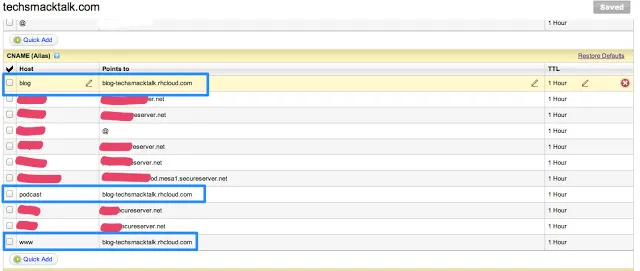
If you want to associate your own domain name eg. (www.yourdomain.com) with your openshift rails app url then you will need to create url alias as shown below
rhc alias add railsapp www.yourdomain.comthen change cname records in your DNS provider account.
-
If your application require some persistent directory for your data then you can use directory (app-root/data/) you can access this directory in your application using enviroment variable OPENSHIFT_DATA_DIR
-
If you want to remove a cartridge
Format:$rhc cartridge remove shortname –app appname –confirm
Sample:$rhc cartridge remove mysql2  –app railsapp –confirm